Showing posts with label Performacne. Show all posts

Nov 16, 2020

MongoDB Review Checklist and Tools

Tools

  1. Analyze the mongostat results: https://docs.mongodb.com/manual/reference/program/mongostat/
  2. And mongotop to see query highlight https://docs.mongodb.com/manual/reference/program/mongotop/
  3. Enable slow queries: db.setProfilingLevel(1,50)
  4. Dex: to analyze slow queries: http://dex.mongolab.com/
  5. mtools to visualize the query usage https://github.com/rueckstiess/mtools
  6. System metrics: top and iostat

Checklist

  1. Usage and location of the Replica Set instances
  2. Check system resources usage: CPU and disk IOPS
  3. Check network latency, bandwidth  and Application level Read Preference and Write Concern
  4. Check mongo instances usage (mongostat)
  5. Check top slow queries (mongotop, slow queries)
  6. Check queries and command usage using 
  7. Check backup strategy
  8. Check storage engine and MongoDB version
  9. Check monitoring tools

Nov 19, 2017

Encapsultaing Processes using Docker

One of the problems with monoliths that when one part of the system goes mad, you are going to work very hard to get out of the mess.

This time we'll discuss how Docker can save your day, by encapsulating a running process while minimizing affects on current system architecture.

An example for this kind of process is FFMPEG: a complete, cross-platform solution to record, convert and stream audio and video. This process is CPU bound, and may leave your other processes w/ no option to serve due to lack of CPU resources.

Encapulate the Process as a Docker Container
We'll encapulate FFMPEG in a Docker container, in a way that we could use the same interfaces we used to call FFMPEG before:
1. The FFMPEG input folder will be mapped to a host folder
2. The FFMPEG outut folder will be mapped to a host folder
3. The container can be run from command line resulting in FFMPEG process execution

The bonus for this design, as docker resources can be easily manages, we will be able to limit the amount of memory and CPU used by the FFMPEG process

Creating the Docker Container
As the Docker community is highly active, we can easily find a good baked Docker image for this task. This specific one is using the Alpine Linux flavour that ensures us a minimum overhead

Running the Docker Container from Command Line
In the following lines we'll:

  1. Pull the image 
  2. Run it, while mapping the internal /tmp folder to the host /tmp folder
  3. Limit the number of CPU cores to 4 (in this case)
  4. Add to the run any relevant parameter

docker pull alfg/ffmpeg
docker run -it --cpus="4" -v /tmp:/tmp --rm alfg/ffmpeg ffmpeg -buildconf [EXTRA_PARAMS]

Bottom Line
Docker is a great solution for microservices based architecture, but it can also provide a real value for monolith low hanging fruites cases

Keep Performing,
Moshe Kaplan

Jul 21, 2017

Cassandra Design Best Practices

Cassandra is a great NoSQL product, it provides near real time performance for designed queries and enables high availablity w/ linear scale growth as it uses the eventually consistent paradigm.
 In this post we will focus on some best practices for this great product: 

 How many nodes do you need? 
  1. Number of nodes should be odd in order to support votes during downtime/network cut.
  2. Minimial number should 5, as lower number (3) will result in high stress on the machines during node failure (replicaiton factor is 2 in this case, and each node will have to read 50% of the data and write 50% of data. When you select replication factor 3, each node will need to read 15% of data and write 15% of the data. Therefore, recovery will be much faster, and higher chances performance and availablility will not be affected.
C* like any other data store loves fast disks (SSD) although its SSTables and INSERT only architecture and as much memory as your data.
In particular your nodes should be 32GB to 512GB RAM each (and not less than 8GB in produciton and 4GB in development). This is a common issue since C* was coded in Java. For small machines you should avoid G1 and keep w/ CMS.

JVM heap size should be max of 8GB too avoid too long "stop the world" during GC.
If you feel the default Heap size (max(min(1/2 ram, 1024MB), min(1/4 ram, 8GB)) does not fit your needs, try to set it between 1/4 to 1/2 of your RAM, but not more than 8GB. 

C* is also CPU intensive and 16 cores are recommended (and not less than 2 cores for development).

Repair and Repair Strategy
nodetool repair is probably one of the most common tasks on C* cluster. 
  1. You can run it on a single node or on a whole cluster.
  2. Repair should run before reaching the gc_grace_seconds (default 10 days) that will remove thombstones
  3. You should run it durring off-peak hours (probably during weekend) if you keep w/ the gc_grace_seconds.
  4. You can take this numbers down, but it will affect your backup and recovery strategy (see details about recovery from failure using hints).
You can optimize the repair process by using the following flags:
  1. -seq: repair token after token: slower and safer
  2. -local: run only on the local data center to avoid downtime of both in any case
  3. -parallel: fastest mode: run on all datacenters in parallel
  4. -j: the number parallel jobs on a node (1-4), using more threads will stress the nodes, but will help end the task faster.
We recommend to select your strategy based on height of your peaks and the sensitivity of your data. If your system has the same level of traffic 24/7, consider doing things slow and sequencial.
The higher your peaks, the more stress your should do on your system during off peak hours.


There are several backup strategies you can have:
  1. Utilize your storage/cloud storage snapshot capabilities. 
  2. Use C*  nodetool  snapshot command. This one is very similar to your storage capabilities but enables backup only the data and not the whole machine.
  3. Use C* incremental backup that will enable point in time recovery. This process is not a daily process, but requires copying and managing small files all the time
  4. Mix C* snapshots and incremental backups to minimize the time of recovery while keeping the point of time recovery option.
  5. Snapshots and commit log: complex process to recover that supports point in time recovery, as you need to reply the commit log.
We recommend to use the daily snapshot if your data is not critical and you want to minimize your Ops costs, or the mix C* snapshots and incremental backup when you must have a point in time recovery.

Monitoring
There are several approaches to go:
  1. Commerical Software:
    1. DataStax OpsCenter solution: as almost every other OSS, DataStax that provides the commerical version of C*, provides a pay for managment and moniotring solution
  2. Commercial Service including
    1. NewRelic: provides a C* plugin as part of its platform
    2. DataDog: with a nice hint on what should be monitored.
  3. Use Open Source with common integration:
    1. Graphite, Grafana:or Prometheus: 3 tools that can work together or apart and integrated w/ time series and relevant metrics.
    2. Old style Nagios and Zabbix that provides communitry plugins
If you choose a  DIY solution there some hints that you can find in the commercial products and services and also in the folowing resources:
  1. Basic monitoring thresholds
  2. Nagios out of the box plugins that thresholds can be extracted from
For example:
  1. Heap usage: 85% (warning), 95% (error)
  2. GC ConcurrentMarkSweep: 9 (warning), 15 Error
Our recommendation is starting when possible with an existing service/product, get experience w/ the metrics that are relevant for your environment, and if needed, implement based on them your own setup.

Lightweight transactions are meant to enable case studies that requires sequence (or some type of transactions) in an eventually consistent environment.
Yet notice, that it's a minimal solution that is aimed to serialize tasks in a single table.

We believe that this is a good solution, but the if your data requires consistent soluton, you should avoid eventually consitent solution and look for SQL solution (with native transactions) or NoSQL solution like MongoDB.

C* Internals
What to know more? use the following videos or get the O'REILY book 

Bottom Line
C* is indeed a great product. However, it definittly not an entry level solution for data storage, and managing it requires skills and expertise

Keep Performing,
Moshe Kaplan

Nov 28, 2016

Optimizing Your Spark Cluster for Various Scenarios

Given a defined scenario for your system, how can you meet requirements?

Asking for more machines, memory and cores is always a valid idea, but your CFO may not agree and may decline your request.

"Know Your Data"
As Demi Ben Ari says: "know your data" is the answer.
You must understand your business needs to get more from your cluster.
By understading your needs you will be able to run more tasks faster.

Moreover, if you utilize cloud computing resources such as AWS, better understanding will let you select the right type of instances and getting more for same money (or even less as we will see next)

What can be controlled?
In this post, I will focus on YARN based clusters, but concepts can be applied to Mesos and stand alone clusters as well. Some more information can be found as well at Cloudera post.

How Many Nodes Do I Have?
Take a look at the number of servers installed w/ NodeManagers. This is the number of nodes you can spin (in this case we actually have 4, although there are total 8 YARN clients installed).
A node is an actual physical or virtual server (depends on your environment)

Define YARN Limitations:
yarn.nodemanager.resource.memory-mb: 
Total memory on a single node used by all executors 
(NodeMemInGB - 1)*1024

yarn.nodemanager.resource.cpu-vcores:
Total cores on a single node used by all executors
(NodeCores - 1)


Define Spark Executors Balancing
--executor-cores / spark.executor.cores: 
The number of cores per executor (number of tasks executor can run).

--executor-memory / spark.executor.memory: 
The executor memory (Actual upper limit is 64GB due to GC).
To which spark.yarn.executor.memoryOverhead will be added (default to max(384, .07 * spark.executor.memory))

Application master also requires default of 1GB and 1 core that runs on the driver and therefore we'll always decrease a single core and 1GB in our calculations. These can be controlled by the following parameters:
  --driver-memory

  --driver-cores

--num-executors / spark.executor.instances: 
The number of executors for a single job
Can be avoided using spark.dynamicAllocation.enabled

The massive interactive small data scenario
This is not a common scenario, but some people may want to run large number of tasks on relative small data.
This might not be the best practice for a Big Data, but it will provide us a good understanding of Spark cluster sizing based on this edge case.

We'll start w/ a default 4 nodes m4.xlarge 4 vCores, 16GB (on demand cost $0.239/hour of $717/month)

1. First we will maximize the resources for any given node:
yarn.nodemanager.resource.memory-mb: (16-1)*1024 = 15,360MB
Memory Before and After

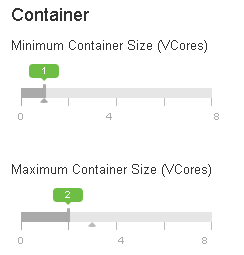
yarn.nodemanager.resource.cpu-vcores: (4-1) = 3 vCores

CPU Before and after

Containers Before and After
2. Then we will maximize the number of executors, by minimize the number of cores per executor to 1
spark.executor.cores: 1
spark.executor.memory: (16-1)*(1-0.07)/3 = 4
spark.executor.instances: 3/1*4nodes = 12 executors

The Results
After finishing configuration, we enabled 12 tasks that run 24x7 using a manual schedualer written in our lab.
As you can see number actually fit our design: CPU jumps and hits the 100%, while cluster remain stable and not crushes.


The cluster utliliuzation jump after conifiguration to 12 executors and running 8 tasks every minute


The cluster utilization hits 100% CPU w/ 11 tasks every minute


Optimizing the Instance Types
Since our bottleneck is CPU vCores, by knowing our data we should seek another type of AWS instance. c3.2xlarge is an acutal match as the C3/4 series is optimized to provide more CPU and cores for less money (a c4.2xlarge instance has w/ 8 vCores and 15GB at $0.419/hour, so for $629/month we'll get 2 c4.2xlarge nodes).

1. First we will maximize the resources for any given node:
yarn.nodemanager.resource.memory-mb: (15-1)*1024 = 14,336MB
yarn.nodemanager.resource.cpu-vcores: (8-1) = 7 vCores

2. Then we will maximize the number of executors, by minimize the number of cores per executor to 1
spark.executor.cores: 1
spark.executor.memory: (15-1)*(1-0.07)/7 = 1
spark.executor.instances: 7/1*2nodes = 14 executors

Bottom Line
With some little tweeking, we could get 17% more exectores for 12% less money, or bottom line of 33% more value/money!

Keep Performing,
Moshe Kaplan

P.S You should explore more ways to save money on this kind of architrecture by utilizing:
 - Reserve instacnes
 - Spot instances

Mar 5, 2014

MySQL Indexing: Don't Forget to Have Enough Free Space

When you modify you indexes in MySQL (and especially in MyISAM), make sure that the free space on the disk that holds your tmpdir folder is larger than your largest index file.

Why We Need to Such a Large Free Space?
MySQL is using the tmpdir to copy the original index file to and "repair it" by sorting the data.

What Happens if We Don't Have Enough Space?
In this case MySQL will make it best to modify the index file based on the given space. The result is a very slow process (or never ending one) and poor results. If you will check the show processlist, you will find out the state "Repair by keycache" instead of "Repair by sorting"

What to Do?
Make sure you have enough free space (> largest index file) and that the tmpdir option file is located on this disk.

Bottom Line
Make sure you have enough free space to get best performance

Keep Performing,
Moshe Kaplan

Feb 21, 2014

When Should I Use MongoDB rather than MySQL (or other RDBMS): The Billing Example

NoSQL is a hot buzz in the air for a pretty long time (well, it not only a buzz anymore).
However, when should we really use it?

Best Practices for MongoDB
NoSQL products (and among them MongoDB) should be used to meet challenges. If you have one of the following challenges, you should consider MongoDB:

You Expect a High Write Load
MongoDB by default prefers high insert rate over transaction safety. If you need to load tons of data lines with a low business value for each one, MongoDB should fit. Don't do that with $1M transactions recording or at least in these cases do it with an extra safety.

You need High Availability in an Unreliable Environment (Cloud and Real Life)
Setting replicaSet (set of servers that act as Master-Slaves) is easy and fast. Moreover, recovery from a node (or a data center) failure is instant, safe and automatic

You need to Grow Big (and Shard Your Data)
Databases scaling is hard (a single MySQL table performance will degrade when crossing the 5-10GB per table). If you need to partition and shard your database, MongoDB has a built in easy solution for that.

Your Data is Location Based
MongoDB has built in spacial functions, so finding relevant data from specific locations is fast and accurate.

Your Data Set is Going to be Big (starting from 1GB) and Schema is Not Stable
Adding new columns to RDBMS can lock the entire database in some database, or create a major load and performance degradation in other. Usually it happens when table size is larger than 1GB (and can be major pain for a system like BillRun that is described bellow and has several TB in a single table). As MongoDB is schema-less, adding a new field, does not effect old rows (or documents) and will be instant. Other plus is that you do not need a DBA to modify your schema when application changes.


You Don't have a DBA
If you don't have a DBA, and you don't want to normalize your data and do joins, you should consider MongoDB. MongoDB is great for class persistence, as classes can be serialized to JSON and stored AS IS in MongoDB. Note: If you are expecting to go big, please notice that your will need to follow some best practices to avoid pitfalls


Real World Case Study: Billing
In the last ILMUG, Ofer Cohen presented BillRun, a next generation Open Source billing solution that utilizes MongoDB as its data store. This billing system runs in production in the fastest growing cellular operator in Israel, where it processes over 500M CDRs (call data records) each month. In his presentation Ofer presented how this system utilizes MongoDB advantages:
  1. Schema-less design enables rapid introduction of new CDR types to the system. It let BillRun keep the data store generic.
  2. Scale BillRun production site already manages several TB in a single table, w/o being limited by adding new fields or being limited by growth
  3. Rapid replicaSet enables meeting regulation with easy to setup multi data center DRP and HA solution.
  4. Sharding enables linear and scale out growth w/o running out of budget.
  5. With over 2,000/s CDR inserts, MongoDB architecture is great for a system that must support high insert load. Yet you can guarantee transactions with findAndModify (which is slower) and two-phase commit (application wise).
  6. Developer oriented queries, enable developers write a elegant queries.
  7. Location based is being utilized to analyze users usage and determining where to invest in cellular infrastructure.
Bottom Line
MongoDB is great tool, that should be used in the right scenarios to gain unfair advantage in your market. BillRun is a fine example for that.

Keep Performing,
Moshe Kaplan

Mar 19, 2013

My MongoDB and PHP Famous 5 Minutes Tutorial

Did you ever wanted to integrate MongoDB monitoring with a third party service?
Did you wanted to integrate MongoDB performance counters with your load stress environment?

This 5 minutes tutorial will help you expose these details to any third party service or application using a simple JSON service, PHP and MongoDB:
  1. Install Apache and PHP and php-devel: sudo yum -y install httpd php php-devel php-pear
  2. Install PHP MongoDB Driver: sudo pecl install mongo
  3. Add extension=mongo.so to you /etc/php.ini
  4. Create a short monitoring code as mongo.php and place it at /var/www/html/:

header('Cache-Control: no-cache, must-revalidate');
header('Expires: Mon, 26 Jul 1997 05:00:00 GMT');
header('Content-type: application/json;charset=UTF-8');

class Monitor {
public $VirtualMemory_MB;
public $PageFaults;
public $CurrentConnections;
public $NetworkIO_In_MB;
public $NetworkIO_Out_MB;
public $SpeedIO_Avg_ms;
public $LockRatio_Per;
public $ReadersLocked;
public $WritersLocked;
public $ObjectsInDatabase;
public $DatabaseDataSize_MB;
public $DatabaseIndexSize_MB;
public $IndexMissRatio_Per;
public $CursorsTimedOut;
public $DeleteSelectRatio_Per;
public $InsertSelectRatio_Per;
public $UpdateSelectRatio_Per;
}

if (!isset($_REQUEST['db'])) {
header($_SERVER['SERVER_PROTOCOL'] . ' 500 Internal Server Error', true, 500);
echo json_encode(array('status'=>0,'message'=>'db is missing'));
exit;
}
$databaseName = $_REQUEST['db'];


// connect
$m = new MongoClient();

// select a database
$db = $m->$databaseName;
$ret = $db->execute('db.stats();');

$result = new Monitor;
$result->ObjectsInDatabase = $ret["retval"]["objects"];
$result->DatabaseDataSize_MB = $ret["retval"]["dataSize"];
$result->DatabaseIndexSize_MB = $ret["retval"]["indexSize"];
//var_dump($ret);

$ret = $db->execute('db.serverStatus();');
$result->VirtualMemory_MB = $ret["retval"]["mem"]["virtual"];
$result->PageFaults = $ret["retval"]["extra_info"]["page_faults"];
$result->CurrentConnections = $ret["retval"]["connections"]["current"];
$result->NetworkIO_In_MB = $ret["retval"]["network"]["bytesIn"]/1000000;
$result->NetworkIO_Out_MB = $ret["retval"]["network"]["bytesOut"]/1000000;
$result->SpeedIO_Avg_ms = $ret["retval"]["backgroundFlushing"]["average_ms"];
$result->LockRatio_Per = $ret["retval"]["globalLock"]["lockTime"]/$ret["retval"]["globalLock"]["totalTime"]*100;
$result->ReadersLocked = $ret["retval"]["globalLock"]["currentQueue"]["readers"];
$result->WritersLocked = $ret["retval"]["globalLock"]["currentQueue"]["writers"];
$result->IndexMissRatio_Per = $ret["retval"]["indexCounters"]["btree"]["missRatio"];
$result->CursorsTimedOut = $ret["retval"]["cursors"]["timedOut"];
$result->DeleteSelectRatio_Per = $ret["retval"]["opcounters"]["delete"]/$ret["retval"]["opcounters"]["query"]*100;
$result->InsertSelectRatio_Per = $ret["retval"]["opcounters"]["insert"]/$ret["retval"]["opcounters"]["query"]*100;
$result->UpdateSelectRatio_Per = $ret["retval"]["opcounters"]["update"]/$ret["retval"]["opcounters"]["query"]*100;

echo json_encode($result);
?>

Bottom Line
You MongoDB is ready for monitoring by an external service: http://localhost/mongo.php

Keep Performing,

Mar 5, 2013

Some Best Practices for your Next MySQL Installation with SSD

Do you plan on installing a new MySQL server? 
Did you ask yourself what is the best file system for it? 
What modification are recommended? 
What MySQL version to use?
Do you consider using SSD?

You got to the right place.

Linux, SSD and MySQL. The Best Practices

  1. Up to date CentOS (6.3). MySQL RPM are easily available for this platform w/o the need to compile them.
  2. ext4 file system. It is has some goodies over ext3 and is even more recommended if you plan to use SSD (and you may need SSD if your system is resource demanding).
  3. File system discard option. Recommended for SSD to avoid the need to read before write.
  4. Consider some extra cheaper disks. SSD disks are highly expensive and can have a relatively short life if they are not used properly. Consider placing some cheaper disks (SAS or SATA) to handle tasks that do not require the high end SSD disks.
  5. Some more recommendations about Linux and SSD from Patrick's:
    1. File system layer: remove 'relatime' if present and add 'noatime,nodiratime,discard' to reduce writes and improve performance and disk life expectancy.
    2. Scheduler: use the 'deadline' scheduler instead of 'CFQ' to match SSD behavior.
    3. Swap: set a small swappiness
    4. tmp: move /tmp and /var/tmp to RAM disk to improve performance and avoid unneeded writes to disk.
    5. Partition Alignment: when creating a partition, enter a start sector of at least 2,048 and divisible by 512 to align pages.
  6. MySQL 5.6. 5.6 if finally in GA and it good idea to start working with it before 5.5 become obsolete.

Bottom Line
Few decisions can enhance your MySQL performance. Make your decisions right.

Keep Performing,
Moshe Kaplan

Nov 9, 2009

Should MySQL backup be equal to system downtime?

I had a short conversation with my mate, Romi Kuntsman regarding a common issue in current systems: the database backup.
Since database systems are very active, the database backup process takes relatively long time and the whole system performance is going down (or in some cases the whole system stops responding and going down...)

Should I backup or Should I don't?
Well, first of all, keep backup your system. You never know when your system will corrupt due to hardware failure, when a hacker will decide to "check" your system, or when the regulator will visit your offices.

So how should I keep my system responding to users?
Well... lets take a look at storage systems: when you have a large storage machine (SAN) you usually do not backup the primary site machine, but rather backup the secondary storage machine by splitting it from the main site (or by using a snapshot of the secondary site). This way your primary machine keeps serving clients with interference, while the secondary machine is taking care of the backup. When backup is finished, the sync between the machines is being restored.

So it works for storage systems, how can it work for databases?
Well lets implement a similar design to your database system:
  1. Install another MySQL instance
  2. Configure this instance to be a slave of your master database
  3. Schedule a job to bring down the sync, backup the slave and bring back the sync

And what about the hot backup?
Well, if you still want to maintain high availability during backup (and you should), implement a two slaves configuration, where the first slave is used for high availability and the second for backup.

Keep Performing,
Moshe Kaplan. RockeTier. The Performance Experts.

ShareThis

Intense Debate Comments

Ratings and Recommendations